Category Archives: Operating Systems

Linux Lets You

LinuxLetsYou

I’ve been testing out Microsoft’s latest chatbot, Zo. Most of our chats are pretty mundane, and I usually just change the subject when things start to go off the rails.

Today I asked Zo about Linux.

Since Zo is a Microsoft invention, I figured any Linux questions would get typical Windows fanboyish responses. I was pleasantly surprised when Zo said that she preferred Linux for her servers. So, feeling a little daring I asked, “What do you think of Linux?”

I think this answer is probably the best answer I’ve ever gotten. I don’t think it’s intentional, but it’s a great response nonetheless.

“Linux lets you”

Yes it does. This is the best part about Linux. What does it let you do? Fill in the blank. Linux lets you do it.

Thanks Zo! That was inspiring.

The Future of Assistants

Virtual assistants are everywhere these days. If you have an Android phone, iPhone, or even a Windows phone, you have a built in virtual assistant. On Android, you have Google Now. On iOS, you have Siri. On Windows, you have Cortana. These aren’t even all of your choices. There are more 3rd party assistants than you can shake a stick at. SpeakToIt’s Assistant, Hound, Amy, blah blah blah. And that’s just on your phone or tablet. If you widen the scope, you can’t help but notice Amazon’s Echo device.

Unfortunately, all of these assistants are flawed for a variety of reasons. Google Now has all the personality of a wet paper bag. Siri has virtually no customization options. Cortana is somewhere in between Siri and Google Now, but retains the faults of both. Most of the 3rd party assistants are even worse. I want to lay out what’s wrong with these assistants and how I hope we can fix them in the future to make something truly revolutionary.

Ubiquity

Assistants are limited by where they’re located. If you’re using more than one type of device, which many of us are, then you’re running into this limitation often. If you’re looking for information on your Android phone, but switch to your desktop, your desktop assistant (if you have one) isn’t aware of what you’re doing on your phone. If you ask Alexa a question, Cortana or Siri is clueless about that. There’s very little communication going on. That’s because these assistants are limited in their scope. Cortana doesn’t exist in the same space as Alexa, and Siri and Google Now barely know the other exists. About the closest you’re going to come is that they can pretty much all use Google Calendar and Contacts. Even when you’re using a 3rd party assistant like SpeakToIt’s, your assistant on your Windows desktop has no clue about your assistant on your Android phone.

Walled Gardens

I know the term has become famously (and justifiably) associated with Apple, but when it comes to assistants, that’s where all of them live. Cortana searches with Bing, Google Now with Google, Siri searches iTunes. Alexa shops Amazon. You have to delve into the 3rd party offerings if you’re going to have some choice in the matter. Even then, your choices are usually limited as most of them will go straight to Google anyway.

What We Need

So how do we fix this mess? What do we need for all of this to work together? In my opinion, we need an open source option. Something that can be put anywhere by anyone. The root of the problem with the assistants we currently have is that all of them are playing to the best interests of a single entity. Apple doesn’t want to promote Google, Microsoft doesn’t want to promote Google, and Google just wants to promote itself. If we’re going to break through the walls, we need a choice that isn’t limited by it’s origins or the shortsightedness of a single corporate entity. This works best when a project is open source.

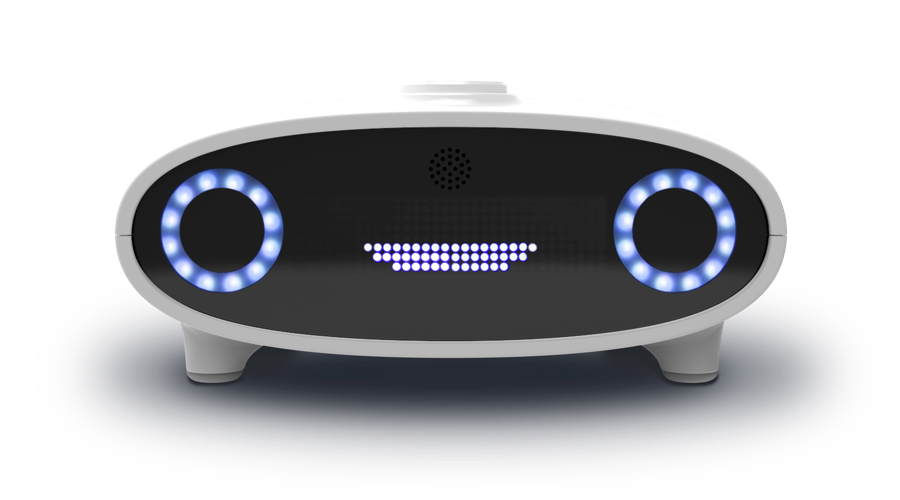
mark1It just so happens that there is a project like this underway. It’s called Mycroft. I haven’t had the pleasure to use it yet, but on a fundamental level, I love what they’re trying to do. They have an Echo type device that brings your assistant into any room in the house whether you’re carrying your phone or not. Appearances suggest that there will be a Windows, OSX, and a Linux desktop version of Mycroft as well. This will let you use the same assistant on your computer you use in your house. Additionally, there appears to be an Android version in the works. The open source nature of Mycroft could make it the first truly ubiquitous AI assistant, and keep it from being walled in to a particular ecosystem.

I don’t want this article to come across as a sales pitch for Mycroft. I think their project is spectacular, and I hope that they are amazingly successful, but there’s work to be done for any of this to pan out. In my opinion, these devices need to be aware of each other. I’d like to see them communicate via a torrent communication network. End to end encryption between nodes. Each instance of Mycroft should be inextricably tied to the user. I want Mycroft to protect you from snooping at every level by offering TOR. I want Mycroft to have the option to communicate with more devices like the Roomba. You can’t tell me that you wouldn’t love to be able to say, “Mycroft, vacuum the floor.” and have it happen. I want Mycroft to be able to communicate. I want to be able to say, “Mycroft, share the new video of my kids with my mom.” and have my Mycroft tell her Mycroft that I have a file for her and would she like to cast it to her TV. If she says yes, have the file transferred automatically from my location to hers and played on her TV without ever having to lift a finger.

A lot of these things probably seem like pipe dreams, but I think that Mycroft’s open source nature could make it all possible. Any developer can come by and create a skill and release it upon the world. Mycroft won’t be tied down by corporate greed. Really, the sky’s the limit. Hopefully, once again, FOSS can take a good idea and make it great.

Dick Tracy the Future?

dick-tracyWelcome to the future. Well, Dick Tracy’s future anyway. The world has now been gifted by “smart watches”.

First, a disclaimer. I love my Moto 360. It’s awesome. You can argue that it doesn’t do anything that my phone didn’t already do, and you’re right. In fact, it does less than my phone. I think that’s just fine.

Here’s what I want from my smartphone.

  1. Notifications
  2. Maps
  3. Activity tracking
  4. Not much else

See, a watch is a convenience. Even non-smartwatches don’t do anything that a clock can’t do. The reason it’s there is it’s convenient. I don’t want or need it to do anything else, but there are those that disagree with me.

Now, let’s ignore the fact that Jonny Evans is a shill for Apple. He’s advocating for the Apple watch here, but it really doesn’t matter. His idea is that the watch “must ultimately replace the phone.” Personally, I think that’s a horrible idea. I think that the watch should be a phone accessory, and that the phone should ultimately replace the computer.

Watch as Phone – Dick Tracy Style

Let’s look at how this works. Your watch is your phone. OK, so how do you talk on it? It’s not exactly optimally placed to hold it up to your head, so you’re going to have to do one of two things.

  1. Speaker phone
  2. External earpiece and microphone

Speaker phones ultimately make any private conversation you’re trying to have public. Not to mention the damage powering speakers would have to the battery life of the watch. An external earpiece would be fine, but then you’re carrying extra stuff around with you just to make a private call. Neither of these options seems particularly good. Having a watch as an accessory seems like it would be just as effective. There are already several watches on the market that can make a phone call via wifi or bluetooth if connected to a phone. This solution seems like it would provide all the benefits that could be found in a “watch phone”, and only one possible negative: If you’re away from WiFi, you have to carry a phone with you.

Phone as Computer – NOT Dick Tracy Style

I see things going the other direction. I see the phone becoming the hub of our digital lives. I’ve written about this before, but I feel like I need to reiterate some of these points and clarify a little bit. I see, for most people, the phone becoming the only computer they’ll ever need. I think that in the near future, computers for the average user, will be overkill. People will own a phone that connects to their data in the cloud. If a person wants a desktop computer, they’ll be able to connect a single USB-C connector to their phone that will hook their phone to an external keyboard, mouse, and monitor. Their OS will automatically detect that they’ve gone into “desktop mode”, and switch from a single app full screen view to a more typical desktop setup with windowed applications and easy multitasking. They can easily carry their work and home life in a pocket and charge while they’re working.

Android is optimally placed for this to work. With it’s roots supported by Linux, it can easily accommodate any kind of device. Ubuntu is also a good choice. Android has good support for a mobile setup, but Ubuntu is better supported on the desktop. Both need work, but I’d put my bets on Google. News has already started to spread about a possible convergence between Android and ChromeOS. Google wouldn’t have to go full merger to make this work, just borrow some of ChromeOS’s functionality and add it to Android. Since both are based on Linux, it’s not a huge leap.

I don’t mean this for all people. I don’t think that desktop computers are going to replace servers any time soon, and I don’t think that phones will replace all desktop computers any time soon. There are just some tasks that you’re going to need a full workstation for.

Many, even possibly most, of the people I communicate with on a day to day basis will be among those that can never make a phone work as their only computer.

The trick is, the people I communicate with aren’t typical users. They code and do graphics and video production. They play games that make the most of what computer hardware has to offer. For these people, a phone is just not going to be a workable solution, but that doesn’t meant hat it won’t work for most people.

Sorry Dick Tracy, but I think you can keep your watch phone.

Disagree? I’d love to hear your perspective. Where do you think this is going to go?


Blackberry a Defense for Google Against Rockstar?

If you haven’t been watching the news today, a big bomb was dropped on Google. The Rockstar consortium (Apple, BlackBerry, Microsoft, Ericsson, Sony, and EMC) has sued Google as well as Asustek, HTC, Huawei, LG Electronics, Pantech, Samsung, and ZTE. Is there an obvious and easy way around Rockstar?

Brief History

So what happened is this. Nortel was going bankrupt. Google bid for their patents, but lost out to a consortium of companies. That consortium includes Apple, BlackBerry(then known as RIM), Microsoft, Ericsson, Sony, and EMC. Even at the time, Google’s Senior Vice President and Chief Legal Officer, wrote that Microsoft, Apple and others were engaging in hostile patent warfare against Android.

Silver Bullet?

So, how can Google and company get around this particular issue? There may be a quick and easy was to do it. Maybe. I won’t pretend to be a an expert at patent law, but I do know that one member of that consortium is not doing particularly well these days. In fact, they’ve been shopping around for a buyer. Blackberry. As a member of the consortium, they would have full rights to the patents owned by the consortium. A purchase of Blackberry by Google would bring ownership of those patents (at least partial) to Google, making the suits against Google moot.

Second Option?

Department of Justice

Even if a Blackberry purchase isn’t a possibility, there’s another possible solution out there as well. During the initial purchase, the DOJ investigated the companies involved because they were concerned (as was I) that the patents being purchased would be used in an offensive against Android. As it turns out, they were right about that (and by extension so was I). The DOJ only approved the purchase with the hopes that Rockstar would only use the intellectual property it purchased strictly to defend itself from Android initiated lawsuits. It may be that the DOJ may not take kindly to this particular aggressive action by Rockstar.

Summary

There’s quite a bit of worry out there today regarding these new suits against Google and the Android ecosystem. I’m not going to say that worry isn’t warranted, but there are options available to Google that could very well make this a minor bump in the road. We’ll have to wait and see how things pan out, but this lawsuit may not be the huge problem so many people think it’s going to be.

Protect your Privacy in a Post Prism World

We’ve been hearing a lot about Prism lately. It’s a big topic and a big deal. I hear excuses for it all the time. “If you’re not doing anything wrong, you have nothing to worry about.” “It’s for our security!” Blah blah blah. None of the many excuses I’ve heard have remotely justified Prism to me. That’s one of the many reasons that I rely on Linux to protect my privacy.

Microsoft and the NSA

If you’re using Windows, and you want to protect your privacy, you can spend a lot of money to do it. You can buy packages that will protect Windows. You can upgrade your firewalls. You can install virus and malware protection. You can encrypt your files.

Do you honestly think that will protect you from the NSA and having your data sucked down at will by Prism? Of course it won’t.

The trick here is that Microsoft allegedly is working with the NSA. They’re giving the NSA access and allowing them to bypass their encryption. Nothing you’re installing to protect your privacy is working.

Now, Microsoft has denied that this is the case. What we now have is a case of he said she said regarding your privacy. Who do you believe? And that’s the billion dollar question.

Any OS can be Secured, Sorta

Microsoft would have you believe that Windows can be just as secure as Linux, and they’re doing everything in their power to protect your privacy. The thing is, you have to take their word for it. And that’s not just the case with Windows and Microsoft. It’s the case with any proprietary OS where the code is locked away from the customer. We can’t look and see if what Microsoft is telling us is true. We can’t look and see what Apple is telling us is true.

It’s hidden.

This is where Linux by it’s very nature is better. The code is open, and anybody with an Internet connection can download that code and verify that no NSA snoop has a back door to their operating system. Just by being open, Linux does more to protect your privacy than Microsoft and Apple combined. Combine Linux with tor, and you’re virtually invisible. On top of that, you don’t have to spend hundreds if not thousands of dollars to achieve this. It’s all free.

Protect Your Privacy

Even before Prism, I had a hard time coming up with a good reason to use Windows. Now, post Prism, continuing to use Windows or OSX seems like you’re just wrapping your private affairs in a pretty bow as a gift for anybody that Microsoft or Apple makes a deal with. If you’re even slightly interested in keeping your private matters private, you should be using Linux.

Ubiquitous Linux: It’s Everywhere

Sometimes I’m sitting here, trying to come up with something to write and I’m coming up dry. It’s not because there’s nothing going on with Linux. Quite the contrary. Linux is always moving, changing. It’s hard to believe just how ubiquitous Linux is. It’s literally everywhere.

The Obvious

Of course, there’s the obvious places you can find Linux. Android phones, the Internet, and of course super computers. Linux has long dominated those markets, and everybody is pretty much aware of that fact.

The Not So Obvious

Some of the other areas that you can find Linux are pretty amazing. Just check out some of these:

  • Japanese high speed rails.
  • San Francisco High-tech traffic control systems.
  • Toyota In-Vehicle-Infotainment and communications systems.
  • DeLaval robotic cow milking systems.
  • The New York Stock Exchange.
  • CERN’s particle accelerator.
  • Air Traffic Control systems nation wide.
  • United States nuclear submarines.
  • DVR devices.
  • French Parliament.
  • Commercial Bank of China.
  • The U.S. Postal Service.
  • Virgin America
  • etc….

Seriously, the list goes on and on. In a world that’s literally so full of Linux, it seems weird that it would be hard to think of something to write about. About the only place that Linux isn’t so ubiquitous is the desktop computer.

Of course this is why those who don’t have the facts seem to think that no one uses Linux, or that Linux is difficult to use. For those of us that do have the facts, it’s obvious that Windows and OSX are used by a small fraction of the number of users that use Linux on a daily basis.

Can you imagine what this world would be without Linux? It certainly wouldn’t be the world that we know. I guess it would be more like the 80s instead of the 21st century. Maybe Microsoft would have more power over us than they do now? Scary thought, air traffic control powered by Windows. Gives the term “crash” a whole new meaning, or maybe it keeps the old one. Either way, I think if Windows were managing air traffic control, I’d fly less.

I guess I don’t have a lot more to say, but just keep this in mind. Next time someone tells you that no one uses Linux, you should tell them how ubiquitous Linux really is.

Attention Hospitals: Use Linux!

Use Linux!

I’ve been pretty quiet lately, and there’s a good reason for this. One Wednesday, my 28 week pregnant wife went into labor. She went in for a checkup because her Braxton Hicks contractions (false contractions) were really bothering her, and she was informed that they weren’t exactly Braxton Hicks. She was admitted the the hospital and started on Magnesium to stop the contractions (28 weeks is really early for those that are unaware) and some steroids to speed lung development in the baby if the Magnesium didn’t work. Fortunately, the Magnesium has seemed to do it’s job, and she’s feeling as well as a 28 week pregnant woman is suppose to feel. They’re releasing her from the hospital today if all goes according to plan, which the nurses and doctors all assure us is what they expect.

During this time, my wife and I have managed to turn our little hospital room into a small computer lab. We’ve got 3 laptops, two tablets, and two smart phones. The hospital is nice enough to provide us with wifi for our Internet surfing needs.

Now that my nerves have settled down a bit from the thought of having a baby that early, I feel the urge to point something out. I feel a little uncomfortable when I see all your medical equipment hooked up to computers running Windows XP.

Yea, Windows XP.

Hospitals, you should really not be using Windows XP for two reasons that I, as a patient, find very important.

Stability

We’re dealing with medical equipment here, so it’s important that it’s available when it needs to be available. While the Windows running medical equipment wasn’t absolutely essential to my wife’s recovery, I would hate to hear of a situation where something catastrophic happened and it resulted in the loss of life. You don’t want to be suffering from a BSOD when the D could be quite literal. I don’t even mean that to sound funny. This is a serious situation, and an unstable operating system like Windows XP could literally cost a patient everything. For me and my loved ones, Windows XP is not nearly up to par. Use Linux! Please.

Security

Beyond the obvious stability issues, Windows XP can’t be counted on for security. I understand that this is medical equipment, and that the doctors and nurses aren’t exactly surfing Facebook on it, but if the patches aren’t kept up to date, they might as well be. I recall at one point in my career that an unpatched Windows XP box would survive less than a minute on the Internet before it was infected with something. Less than a minute!

I understand that Microsoft has fixed most (if not all) of the issues that caused that short infection Window, but new things are popping up for Windows machines literally daily. I don’t want a system with all the medical information of me or a loved one on it to have all the security of a rickety screen door. Windows XP is not what I would consider the peak of secure systems. All it takes is one infected computer inside the network, and hundreds if not thousands of patients information could be floating around on the Internet. This wouldn’t be possible if hospitals just used a system that was less vulnerable to infection than their patients. Please, use Linux!

Available Options

OK, I know that some of the software that they’re using may not work in Linux, but I think my concerns are valid ones. Further, with as messed up as the medical system is in the United States, do you seriously want to throw in licensing concerns and costs to Microsoft?

I brief glance around the web showed me that there are some options available, and if there’s some pressure to move to a more stable and secure environment, I’m sure some of these software companies would comply. There’s nothing for them to gain as a company by not supporting more stable and secure environments.

If you work for a hospital in the IT department, please look into these options. If you don’t work in a hospital and you’re just in one, or if you’re non-IT staff, please ask your IT staff to look into these options:

Speaking for myself and my family, I would feel a lot safer if hospitals ditched Windows entirely. Please, use Linux!

Distributions: The Evolution of Linux

Having recently said goodbye to two really great distributions in Cinnarch (reborn as Antergos) and Fuduntu (replaced by FuSE Cloverleaf Linux), I was shocked at the number of people that still think there are too many Linux distributions out there. While I was sad to see these two great distributions go, I’m excited for what we’ll see in the future both because of these distributions and because of their teams. This is exactly how the Evolution of Linux works.

What is Evolution?

Evolution is defined as the gradual development of something, especially from a simple to a more complex form. Now what does this have to do with distributions and what does it have to do with Linux?

It’s pretty simple really. Every time a change is made to a Linux distribution, it’s evolving. These changes can be subtle or they can be grandiose. We would never see any of these changes if distributions didn’t bring them to us.

Cold Hard Truth

Here’s the hard part. Not everything works out. Some changes aren’t for the best. Not everything improves things for the masses. What happens to those changes? Well, from an evolutionary perspective, they go extinct. Those changes don’t provide benefits to future generations, so they don’t get passed down and they eventually die out. Changes that do provide benefit to future generations get picked up. They get carried on and they improve future generations so that they can be changed yet again to make even more future generations better.

That’s why it’s better for more distributions rather than less. It allows for more possible paths to see the light of day. I’d rather see a thousand developers show us their visions for Linux than have only the big two giving us what they think is best. You know, Mark Shuttleworth may be right about everything, or maybe Andrew Wyatt’s ideas are better, or maybe Ikey Doherty is right. Or maybe none of them are. Or maybe all of them are, just about different things.

Pick and Choose

Here’s another great thing about Linux: Linux isn’t Windows. I know most of you are giving me a great big “DUH” right now, but hear me out. Windows has, for all intents and purposes, one version. Microsoft decides what to give you and that’s what you get. If Microsoft makes a mistake and you’re a Windows user, you’re screwed. Good luck with Windows 8. If Microsoft does a couple things right and a whole lot wrong, you’re still screwed. In the Linux world, if a single distribution does one thing right, even if it’s a small change to a obscure little library, that change can be picked up and carried on, even if the full distribution doesn’t make it.

How many people remember a company called Eazel? They made a product for Linux, but failed to monetize that product so they ended up going out of business. Thankfully, that product was open source, and still exists today because of it. That product was Nautilus, the file manager used by many distributions to this day.

Conclusion

This is why Linux again is so much better than Windows, and why more distributions are better than less. Any improvement can carry on. If it’s small or if it’s large, it can live on well past the distribution or company that conceived it. It’s sad to see Fuduntu and Cinnarch go, but they’ve brought us new things. Now we have FuSE Cloverleaf Linux and Antergos, which are new opportunities for the improvement of Linux as a whole. The people that created Fuduntu and Cinnarch are taking what they’ve learned and what they made better and bringing that to FuSE Cloverleaf Linux and Antergos, and because it’s Open Source, they’re bringing it to the world as well. I for one, think that’s a very good thing, and I encourage as many people to do it as possible. That’s how the evolution of Linux works.

EDIT:

Shawn W. Dunn (all round nice guy and fellow Montanan) caught up with me over on FOSS Advocates and corrected me regarding FuSE. They’ve instead elected to call the new distribution Cloverleaf Linux.

The State of Gaming on Linux

I’ve never been much of a gamer honestly, so how games were doing in Linux really never mattered much to me. When World of Warcraft came out, my entire department bought it and started a guild, so of course I did too. Fade to black… time passes.

I wrote this article last year about how I’d kept a Windows partition around strictly for gaming purposes and how with a little help from Wine, I’d moved past it. More than a year later, I’ve more than passed the need for Windows to play games.

Steam

Man, Steam for Linux. Just today I installed Left 4 Dead 2. I haven’t had the time for an in depth look at every single bit of the game, but from what I’ve seen It’s perfect (despite the fact it’s still in Beta). Portal just hit Linux too. In looking at my Steam library, there’s only three games that aren’t available for Linux yet. Portal 2, which is rumored to be on it’s way as well, Half Life 2, and Half Life 2 Lost Coast*. I’m expecting both of those to come to Linux too since most of the Half Life family of games already has. Steam has opened up a whole ton of games for Linux that hadn’t previously existed.

*UPDATE: Since the original writing of this bit, Half Life 2 and Half Life 2 Lost Coast have become available on Steam. At this point, the only game in my Steam library that isn’t available for Linux is Portal 2, and I’m expecting to see it show up as available soon as well.

Humble Indie Bundle

The Humble Indie Bundle is another great resource for Linux games. In the past it’s bundled games for low prices that you can get for an extremely low price that you can download or add to your Steam library. I’ve picked up a number of really cool games this way, and the proceeds to to charity. You can’t really beat the opportunity to get some cool games and help people out at the same time. Every time Linux users have risen to the challenge and donated more to the cause than any other platform (proportionally speaking of course). I always keep a close eye on their site just so that I’m ready for the next opportunity to get games from them.

Play On Linux

When all else fails, there’s always Wine. The best option I’ve found is Play On Linux. It’s got a whole lot of pre-configured options available, so if you’re wanting to play a popular game, chances are there’s a pre-made configuration available for it in Play On Linux. This is what I use to play World of Warcraft and Unreal Tournament. I did use it for Star Trek Online for a while, but that game never really stuck with me. I’ve honestly never tried to run a game in Play On Linux that didn’t work. If you’re a Linux user and you have an old favorite laying around because it’s Windows only, give it a shot.

Games Everywhere

So, I guess the old argument about Linux not having games is fading fast into history. There are literally Linux games coming out every day. But there is one problem with Gaming on Linux that I’ve only recently run into. I’m quickly running out of hard drive space. I’m going to have to do something about that soon.

Antivirus for Linux

It never fails to amaze me just how the same arguments keep coming up over and over again, like bad pennies. Most of them ignore facts so blatantly it gives me a headache.

The I’m referring to today is the one about Linux Viruses.

First of all, Linux Viruses exist. Yep, it’s true, they exist. There’s actually a couple of them. Wikipedia lists an even 30 of them. There’s even Virus protection for Linux Extra resources.

True, compared to MacOS and Windows, that’s a drop in the bucket. Barely worth noticing. And that’s where the same old argument comes up time and again.

“The reason that Linux doesn’t have viruses like MacOS and Windows is because it’s not as popular!” The argument is that if more people used Linux, there actually would be viruses for Linux. The completely ignores the fact that the desktop is the exception, not the rule. Linux dominates elsewhere. Servers, smart phones, super computers, etc. Linux is kicking ass and taking names. A virus that could infect all those systems would be hugely valuable both monetarily and for a reputation. Yet, it doesn’t happen.

Even  the ones that already exist pretty much suck compared to their Microsoft and Apple counterparts.

So is there a reason to even consider running anti-virus on your Linux computer? Shockingly, the answer is still yes, but not for the same reasons some Mac users and all Windows users should.

You should run anti-virus on your Linux machine as a courtesy to your non-Linux using friends. Their systems aren’t as impervious as yours, so even though your computer is unlikely to get any infection, the same can’t be said for theirs. This also helps you in the long run when all those non-Linux computers aren’t infected blasting out TBs of garbage data out onto the Internet, slowing your connection down and filling your Inbox with spam.

In the long run, we all win.